


Table of Contents
The best moving planner is the one your household will still open next week. It should turn a busy move into clear tasks, dates, records and decisions. For a Sydney owner, that means more than packing boxes. You may be juggling settlement, strata access, council parking, utility transfers and removalist bookings. A simple moving house planning app can hold the moving parts together. The trick is choosing tools that solve real problems without creating another job.
This guide compares practical systems, small apps and simple spreadsheets. It also shows where software stops and human checks still matter. As the saying goes, a stitch in time saves nine.

The Ultimate Sydney Owner’s Moving Stack
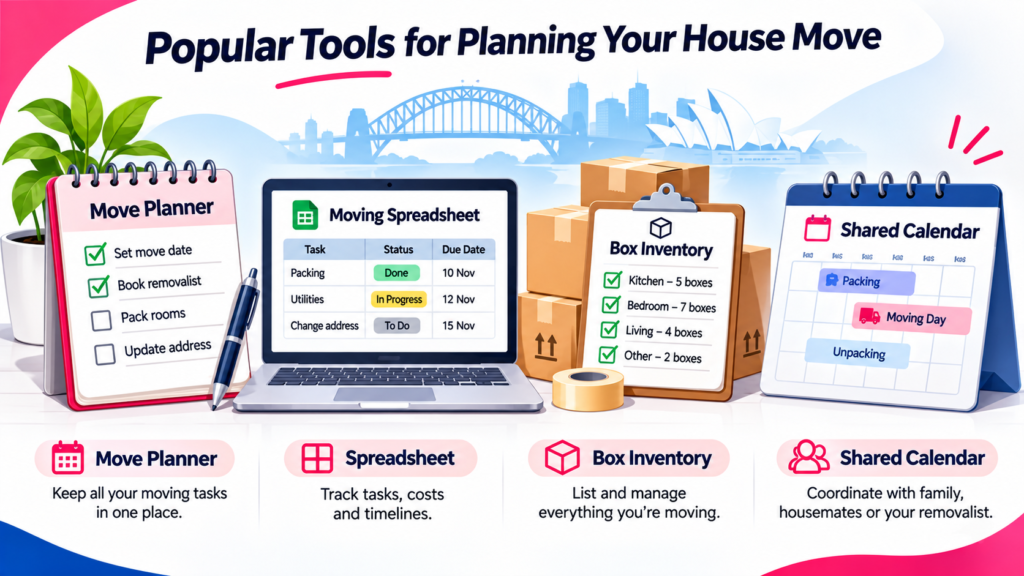
A Sydney moving stack needs one master planner, small tools and one safe record folder. Think of the master planner as the conductor. It keeps each task moving in the right order, while smaller apps handle specialist jobs. You do not need ten apps fighting for attention.
Start with your move date, settlement window, property type and household members. Add the jobs that depend on those dates. A terrace in Newtown may need tight street access planning. A unit in Parramatta may need lift approval. A family home in Ryde may need driveway and furniture measurements. It pays to get your ducks in a row before boxes appear.
For most households, this stack is enough:
- One master plan: deadlines, task owners, reminders and key contacts.
- One packing record: box numbers, room labels, photos and fragile-item notes.
- One space tool: room dimensions, door widths and furniture placement.
- One document folder: settlement papers, quotes, service agreements and receipts.
- One shared calendar: removalist arrival, utility connections, lift bookings and key collection.
Keep the setup boring and easy. A moving house task management system for homeowners should reduce decisions, not multiply them. Give every task one home and one owner. That is the best way to organise a house move.

The Core Move Managers (The “Stick-With-It” Systems)
A core move manager handles the main timeline from the first planning day to unpacking. These systems suit people who want more than a printable list. No need to reinvent the wheel, but check each tool against your actual move.
Movemark
Movemark is the strongest dedicated planner in this shortlist for date-led task management. Its current Android listing describes a moving checklist of around 80 tasks. It adjusts reminders when the move date changes. It also covers box labels, QR scanning, room inventories and address-change tasks. The listing says it can export an inventory PDF. It also supports sharing with four household members. The official website currently promotes a seven-day trial. Its displayed prices are in pounds, so check the Australian checkout price before paying. The proof is in the pudding, so test the daily task view first.
Movemark appears on Google Play, and its website directs users there. I could not verify an equivalent iOS listing during this review. Treat platform availability as a check before building your whole plan around it. It may suit an Android household that wants reminders and box tracking in one place.
It is not a substitute for your conveyancer, strata manager or removalist. Keep legal settlement dates and confirmed booking details in their original documents. Use the app as your day-to-day checklist, not as the only record.
Australian Move-In Planner via Etsy
An Etsy moving planner can be a low-cost way to organise a move without another subscription. The marketplace currently shows digital moving planners in PDF, spreadsheet and printable formats. Listings can include packing tasks, address updates, quote notes, budgets, inventory sheets and room measurements. Horses for courses: choose the format your household will actually use.
I could not verify one live product with the exact title Australian Move-In Planner. Treat that wording as a planner category until you confirm the seller’s current listing. Before buying, check Australian spelling, dates and GST wording. Check editable fields and Google Sheets compatibility too. A United States template may mention services or agencies that do not apply in NSW.
Check the preview pages before purchase. Look for an address-change list, utility tracker, settlement milestones and a removalist quote comparison page. One tidy spreadsheet can beat a 70-page binder if you update it every day.
MoveReady 360° via Etsy
I could not confirm a current Etsy listing under the exact name MoveReady 360°. Do not assume the title guarantees a working app or a complete digital system. Buyer beware, especially when a listing uses broad claims without preview pages.
First, confirm the format. Is it a spreadsheet, printable PDF, Notion template or app? Those formats behave very differently. Look for shared access, reminders, export options and clear instructions. Make sure the seller explains updates and support before you pay.
A genuine 360-degree planner should cover the whole move, not just packing. It should include admin, access, bookings, inventory and the first week at home. If it misses settlement changes, it may not fit an owner-occupier move.
The Micro-Apps Owners Use Concurrently
Micro-apps work best when they solve one annoying task and then get out of your way. Many hands make light work, but too many tools create double entry. Keep the master planner as your source of truth.
For the Box Nightmare
A box inventory is useful when several rooms are packed at once. Movemark offers QR labels and room-based box tracking. A Google Sheet can do the same basic job with fewer features. Add a box number, destination room, short contents list and fragile note. Leave no stone unturned with the items you will need first.
For a three-bedroom home, use a simple numbering pattern such as K-01 for kitchen. Use B-01 for bedrooms and L-01 for the living room. Photograph valuable or fragile items before wrapping them. Link each photo to its box number, not just the room name.
A room-by-room packing inventory spreadsheet should record these fields:
- Box number and destination room.
- Short contents list and priority level.
- Fragile status and special handling notes.
- Photo filename or cloud folder link.
- Packed, loaded, delivered and unpacked status.
This makes it easier to track boxes during a house move and find belongings quickly. A QR code box inventory for moving house is handy, but it is not essential. A clear label still works when the phone battery dies.
For Sydney Spatial Dilemmas
Room measurement tools help you check whether furniture fits the new property. Magicplan supports room plans, measurements, photos and notes. Its current device guidance says iOS scanning uses supported AR features. Android users can build rooms manually, but scanning features are not currently supported there. Measure twice, cut once, especially in older terraces and narrow unit hallways.
Measure the lift, stair turns, door openings and narrowest hallway. Record the sofa, fridge, dining table and bed frame dimensions. Check balcony doors and apartment corridors too. A room planner cannot know every awkward corner from one photo.
A digital room planner for Sydney homeowners can map furniture placement before removalist arrival. Still, use a tape measure for final checks. If a wardrobe barely clears the stair landing, tell the removalist before quote day.
For Offloading the To-Do List
A shared task app helps couples divide the admin without chasing each other. Microsoft To Do supports shared lists and task assignment. Google Calendar can hold fixed bookings and reminders. Todoist offers a free entry plan, with paid upgrades for extra planning features. Don’t let the wheels fall off by running the same task list in three places.
Choose one shared list for jobs and one calendar for booked times. Give every task an owner and due date. Keep notes short, such as ‘call strata by Friday’ or ‘confirm gas connection’. That is enough for most households.
Dedicated Single-Purpose Mobile Apps
Single-purpose apps can be useful, but availability matters more than an old review. The devil is in the detail when an app has not been updated for years. Check the current app-store listing before you depend on it.
Moving Van (iOS / Android)
Moving Van appears in archived app records as an older iOS box-catalogue app. Its archived listing says it was last updated in March 2015. It is no longer distributed by Apple. The archived description refers to box contents, photos, room labels and data export. I could not verify a current Android version. It is past its use-by date as a recommendation for a new 2026 move.
Do not build your current moving plan around an old listing or an unofficial download. Choose a supported spreadsheet or an actively maintained app instead. If you still have old records, export and store them before changing devices.
Sorted App via Muval (iOS / Android)
Sorted and Muval support household services and removalist bookings. They do not provide a full packing timeline. Muval’s current partner page describes comparing removalist prices and booking online. It also describes arranging electricity, gas, internet and other home services through the Sorted platform. Two birds with one stone, if you need both service connections and a quote search.
Keep the distinction clear. Sorted can support service setup and a removalist booking journey. It is not the same as a detailed box inventory or a settlement task manager. Store the final booking confirmation and service reference numbers in your master planner.
The name Sorted is also used by unrelated apps. Check the developer name and current app description before installing. Choose the Australian home-services product. Other list apps use similar names.
What Makes a Moving Planner Worth Keeping?
A moving planner is worth keeping when it saves time every week and protects key details. A stitch in time is useful only when the system stays simple. Would you keep an app that makes you enter the same address three times?
Look for these practical features before choosing a tool:
- Move-date logic: tasks move when settlement or key collection changes.
- Shared access: two people can assign work and see the latest status.
- Reminders: deadlines, bookings and follow-ups appear at the right time.
- Box tracking: room labels, photos, fragile notes and delivered status.
- Document storage: quotes, receipts, agreements and settlement records stay together.
- Offline access: critical lists remain readable when mobile coverage drops.
- Export and backup: you can keep records after cancelling a subscription.
- Privacy controls: you can see who has access and remove shared access later.
Australian moving apps have different strengths. Some are good at daily tasks. Others are better for box labels, floor plans or service connections. Pick the feature you need most, then test the workflow with your partner.
Paper moving checklist vs digital planner is not a winner-takes-all choice. Keep a printed moving day run sheet for the truck and a digital copy for changes. A paper backup is useful if your phone breaks or the network drops.
Understanding the Real Cost of Moving Planning Software
Costs depend on the format. You may buy a template, pay a subscription or use free tools. Look after the pennies, but do not pay for features your household will never touch. There is no need to buy a complex system for one move.
Free Features Versus Paid Upgrades
Free plans usually cover basic lists, dates or reminders. Paid upgrades may add shared access, QR labels, photo storage, automatic reminders or more projects. Check the feature limit before uploading your entire inventory. You get what you pay for. Test the free tier before you depend on it.
Movemark’s website currently displays a seven-day trial, then prices in pounds. Its full plan is shown at £9.99 per month or £2.99 per week. Those are website-displayed prices, not a confirmed Australian app-store amount. Check the currency and final amount at checkout before starting a trial.
Magicplan has in-app purchases for professional floor-plan features. Those tools may be more than a household needs. A free measuring app and a spreadsheet may be enough for one relocation.
One-Off Purchases Versus Subscriptions
Etsy downloads are often one-off purchases. Apps may charge weekly, monthly or yearly. A fair shake means comparing the full cost across your moving period. A cheap template may be enough if you only need a checklist and budget sheet.
A subscription can make sense when the tool saves repeated effort. Check trial length, renewal timing and cancellation steps. Add the renewal date to your calendar on the day you sign up. Do not assume deleting an app cancels its subscription.
Checking Export Options Before Cancelling
Export your records before cancelling an app or deleting an account. Do not put all your eggs in one basket. Save the final inventory, task list, receipts, photos and important dates outside the app.
Prefer common formats such as PDF, CSV or XLSX. Open the export once to check that it contains the information you need. Back up photos and settlement documents in a separate, access-controlled folder.
Connecting Moving Software With Removalist Quotes and Bookings
Your planner should turn a rough idea into a clear removalist brief. Measure twice, move once. A useful quote request includes the property details, access limits, inventory and dates. What good is a low quote when stairs or oversized furniture were left off the brief?
Compare each quote against the same information. Include the suburb, property type, lift or stair access, parking, approximate box count and large furniture. Note whether packing, dismantling, storage or disposal is required. Record the crew size, truck size, arrival window, hourly terms, minimum charge and extra fees.
Your task list should record whether you need house removalists, furniture removalists or office removalists. It may cover interstate removalists or interstate furniture removalists. International removalists may need separate planning. A specialist furniture removalist or piano removalists team may need separate handling details. Some households search removalists near me, removalist near me, cheap removalists or removalist companies. The phrase removalist furniture can signal a furniture-only job. Some search for removalist truck hire. Others need an interstate removalist for longer routes. Local service searches may mention removalists Sydney, removalists Melbourne or removalists Brisbane. Keep the move type clear before comparing quotes.
For local Sydney jobs, check the service area and pickup address. A Parramatta listing may not cover every suburb. Ask each company the same questions. Save written answers with the quote. See Six Brothers’ house removals service for local moving support.
A planner can also hold your removalist quote comparison checklist Sydney owners need. Record quote date, inclusions, exclusions, payment terms and cancellation rules. Save the service agreement, not only the first estimate. For a deeper timeline, use our guide to plan a Sydney house move around settlement dates.
How to Compare Removalists Quotes? Compare like with like. Confirm the inventory, travel terms, access, packing, insurance details and extra charges. A low headline figure is not enough on its own.
Do Removalists Pack for You? Some removalists offer packing services, while others only load and transport. Ask what materials, labour and unpacking support the quote includes.
Owner-Occupier Administration Beyond Packing and Checklists
Owner-occupier admin belongs in the same plan as packing and bookings. A stitch in time saves nine, especially around settlement. Keep the dates, service references and proof of changes together.
Settlement and Key Collection Deadlines
Settlement and key collection dates control when you can access the new home. Keep the confirmed date, conveyancer contact and key collection time in one record. Keep your removalist booking flexible until access is confirmed. Keep your eye on the ball when several parties share the timeline.
Add reminders for the final inspection, settlement confirmation, key handover and first access. Do not treat an expected date as a confirmed date. If the settlement time changes, tell everyone who depends on it.
For a clear sequence, pair your app with a room-by-room moving house checklist for Sydney. That guide can help you work through the home in a practical order.
Electricity, Gas, Water and Internet Transfers
Utility transfers need their own dates and confirmation numbers. Better safe than sorry. Ask each provider whether you can transfer the existing plan or need a new account. Confirm the connection date and whether someone must attend the property.
Energy Made Easy advises customers to notify their retailer early and record meter readings. NBN also recommends checking the new address and arranging service before moving. Keep the provider, reference number, start date and equipment notes in your planner.
Do not assume the old internet equipment belongs in the moving truck. Check which devices are tied to the address. Label the equipment you must leave behind.
Government and Service Address Updates
A change of address checklist Australia wide should include government records and private services. Dot the i’s and cross the t’s. Update the address with myGov and the relevant NSW services. Check your driver licence, vehicle registration, electoral enrolment, bank, insurer, employer and mail redirection.
Keep proof of each update and the date it was completed. Some services share details through linked accounts, but not every organisation receives an update. Your planner should show the remaining tasks, not assume one change updates everything.
A first-time homeowner moving house guide should also cover property documents. Save settlement statements, warranties, appliance manuals and service details. Keep access codes private and share them only with people who need them.
The Reality Check: Sydney-Specific Snags to Plan For
Sydney moves often involve building rules, narrow streets and parking limits. The city can throw a spanner in the works. Add local access checks before choosing a removalist arrival time.
Strata Move-In Bookings
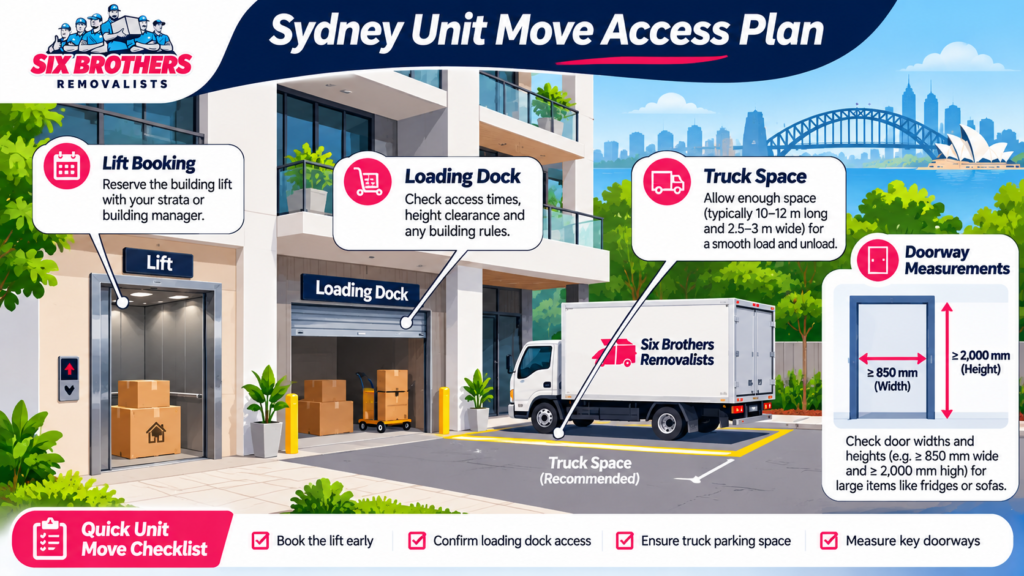
A strata building may require advance notice, a lift booking or protective padding. As they say, the early bird catches the worm. Ask for a written slot. Every scheme can set its own by-laws and building procedures. Ask the strata manager or building manager for the current rules.
Confirm the approved move window, lift size, loading dock, booking deposit and any bond. Ask whether the removalist needs insurance details before access. Save the approval email and booking reference in your planner. Check the NSW strata by-laws for the rules that apply to your scheme.
This matters in high-rise parts of the CBD, North Sydney, Chatswood and Parramatta. A booking may be limited to a set time slot. Do not assume the lift will be free because the truck has arrived.
Did you know?
NSW strata schemes can have different by-laws. Ask for the rules that apply to your exact building.
Council Parking Permits
Council parking rules depend on the local government area and the street signs. The sign tells the story. Ask the relevant council whether a temporary parking exemption or traffic arrangement is needed. Check the City of Sydney’s parking permit options when the property sits inside that council area.
A resident parking permit is not the same as a reserved moving-truck space. Do not assume it protects a loading area for several hours. NSW road rules also restrict stopping in no-stopping zones. A no-parking sign allows only a short loading stop under set conditions. It does not reserve a long loading space.
Check truck height, street width, loading dock clearance and nearby roadworks. For Surry Hills, Newtown or the CBD, share access photos with your removalist. A few minutes of planning can prevent a costly delay.
Keeping Your Moving Plan on Track When Settlement Dates Change
A date change should update the whole plan, not just the calendar title. Keep your cool and work through the dependencies. Your moving planner should make the next actions obvious.
Recalculating Dependent Task Deadlines
When settlement shifts, rebuild tasks from the new confirmed date. Back-calculate the final inspection, key collection, cleaning, packing and utility deadlines. Do not keep old reminders that no longer make sense. Back to square one is annoying, but a clean reset is safer.
Keep a note of the old date and the reason for the change. That gives you a record if a booking or payment needs review. Mark every dependent task as confirmed, pending or rescheduled.
Rescheduling Removalist and Utility Bookings
Tell your removalist and providers as soon as the date changes. Do not leave it until the last minute. Ask about new availability, fees, deposits and cancellation terms. Get revised confirmations in writing.
Update the arrival window, utility start dates, internet connection and any storage booking. If your new date falls on a weekend or public holiday, check provider availability. Keep the old and new reference numbers together.
Updating Shared Household Tasks
Shared tasks need one owner and one current deadline. Too many cooks spoil the broth, so avoid duplicate lists. Ask each household member to confirm their tasks after a date change.
Use a shared app for jobs and a shared calendar for fixed appointments. Set a short weekly review until move day. Keep the plan visible to everyone who has a role.
Post-Move Records and Tasks Your Software Should Handle
The move is not finished when the truck leaves. You are on the home stretch, but the final records still matter. Keep the last records and first-week tasks in your planner.
Photographing Meter Readings and Important Records
Photograph meter readings when you leave and when you arrive. A picture is worth a thousand words. Save each image with the property address, date and meter type. This can help if a final or first bill needs checking.
Keep the condition report, settlement papers, receipts and delivery records in one folder. Use clear filenames, such as ‘new-home-electricity-meter-2026-11-04’. Do not rely on a phone gallery with hundreds of unnamed photos.
Recording Keys, Remotes and Access Details
Record how many keys, fobs and garage remotes you receive. Keep your cards close and store security details carefully. Do not place alarm codes or door codes in an open shared checklist.
Use a secure password manager for codes and share access only with trusted household members. Record who received each key and whether any spare remains with the agent or strata office. Keep the handover note with your settlement documents.
Tracking Missing or Damaged Belongings
Record any missing or damaged item as soon as you notice it. Sooner rather than later gives you a clearer record. Note the box number, item, delivery condition and date. Take photos and keep the relevant quote or service agreement nearby.
Contact the removalist and insurer promptly if a claim may be needed. Follow the time limits and evidence rules in your own documents. Do not assume every item has the same cover or claim process.
Prioritising First-Week Unpacking Tasks
Unpack the essentials before the decorative items. Home is where the kettle is. Start with bedding, basic kitchen items, medication, chargers, bathroom supplies and work equipment. Then set up bins, security, internet and the rooms your family uses most.
Use your planner to mark the first-week jobs and assign owners. Keep the box inventory open until every important item is found. A good plan gives you room to settle, not another deadline to chase.
FAQs
How early should I set up a moving planner?
Start as soon as your move becomes likely. Eight weeks gives many households time to compare tools and services. Urgent moves can use a shorter plan.
Can two people manage one moving schedule?
Yes, when the app supports shared access or you use a shared spreadsheet. Give every task one owner to avoid crossed wires.
Does a moving app replace a removalist booking confirmation?
No. Keep the written quote, service agreement, payment record and confirmed arrival details outside the app too.
Can I use a spreadsheet instead of a moving app?
Yes. A spreadsheet works well when you need tasks, dates, contacts and box records. Choose an app only when reminders or QR scanning add real value.
What should I keep after move day?
Keep settlement records, utility confirmations, meter photos, item inventories and removalist documents. Store them in a private folder you can still access later.
A planner is only one part of a reliable move. When you are ready, visit Six Brothers Removalists and discuss your move. For a Sydney quote, call 1300 764 372 or email info@sixbrothersremovalist.com.au.
Use the moving home calculator to organise the load details before requesting a quote. It is easier to compare removalists when every company receives the same information.