


Table of Contents
Moving computers interstate safely starts with backups, careful packing, and controlled loading. A desktop is not just another box, even when the case feels solid. Treat every component like it must survive a long highway trip.
The safest plan protects your data, screen, internal parts, cables, and setup. Why risk years of work for a rushed packing job? This guide shows the practical steps for Australian interstate moves.

Preparing the Computer
Prepare the computer before packing by protecting data and recording the full setup. If you are learning how to pack a computer for moving, start with data. Shut down properly, remove loose accessories, and check the case for weak points. A little prep now saves a world of pain later.
For Sydney households, Six Brothers Removalists can coordinate computers with the wider interstate load. That helps keep boxes, screens, and accessories under one moving plan. As Aussies say, get your ducks in a row early.
Back Up Data & Document Setup
Back up important data before any computer leaves your desk. Use a cloud backup, an external drive, or both where practical. The Australian Cyber Security Centre also recommends secure and resilient backups.
Photograph the desktop, cable layout, monitor ports, router, and power connections. Save licence keys, recovery codes, passwords, and device serial numbers securely. Better safe than sorry really fits this job.
For work computers, record user profiles, network settings, and specialist software details. Confirm the backup opens before packing the machine. A backup you cannot restore is not much chop.

Unplug and Pack Accessories
Unplug accessories only after the computer is fully shut down. Remove USB devices, external drives, webcams, dongles, speakers, and network cables. Coil each cable loosely instead of bending it tightly.
Label both ends of important cables with simple tags. Put accessories into small labelled bags inside one larger accessories box. Keep tiny adapters together, or they disappear quick smart.
Carry sensitive backup drives separately from the main computer where possible. Never leave loose chargers inside the tower case. A place for everything keeps everything in its place.
Secure the PC Tower (Internal & External)
Secure the tower by stopping heavy parts from flexing or shifting. Check graphics cards, CPU coolers, storage drives, and side panels before boxing. The case is armour, but its contents still need support.
Tighten normal case screws without forcing them. Remove loose glass panels only when the case design allows safe removal. Wrap tempered glass separately with soft foam and rigid protection.
Do not place loose foam pieces directly around exposed fans or connectors. Purpose-built internal packing can help when used correctly. Measure twice and pack once is the smart call.
Packing and Transport
Pack and transport computers inside rigid boxes with cushioning on every side. Original packaging is usually best because its inserts match the device. Strong replacement cartons can work when fitted carefully.
Keep towers upright unless the manufacturer recommends another position. Avoid stacking furniture, toolboxes, or heavy cartons on computer boxes. The box should ride like a passenger wearing a seatbelt.
After the main packing is complete, request a clear written transport plan. A calm plan beats a mad scramble on moving day. No worries starts with knowing who handles what.
Box and Transport
Box the computer with a soft protective layer and firm corner cushioning. Leave enough space for shock absorption without letting the tower slide. Double-wall cartons are useful for heavy desktop systems.
Seal the base and top with quality packing tape. Mark the box fragile, upright, and computer equipment on several sides. Good packing and removals support also helps when original boxes are missing.
Load the box between stable padded items, not beside loose furniture edges. Use straps to stop sliding without crushing the carton. Slow and steady wins the race on long roads.
Choosing an Interstate Shipping Method
Choose a shipping method by balancing protection, timing, handling, and price. A dedicated truck offers tighter scheduling and fewer shared-space constraints. Backloading can lower costs when your delivery dates stay flexible.
Our interstate backloading service can suit well-packed computers when dates stay flexible. Each computer should still be boxed, labelled, inventoried, and protected from shifting. Horses for courses applies here.
Generic search labels do not prove electronics handling skill. A furniture removalist may move heavy items well but miss delicate PC risks. Ask exactly how the provider secures towers and monitors.
Searches such as removalists near me, removalist near me, and cheap removalists show broad options. You may also find removalist companies, removalist truck hire, and removalist furniture services. Those labels are only starting points.
House removalists, office removalists, furniture removalists, and piano removalists solve different handling problems. Interstate removalists and an interstate removalist should explain long-distance restraint clearly. Interstate furniture removalists also need strong labelling systems.
International removalists handle border logistics that normal interstate moves do not require. City searches include removalists Sydney, removalists Melbourne, and removalists Brisbane. Pick proven computer handling over the loudest advert.
Sydney search wording varies across services and suburbs. Common terms include removalist from Sydney, removalist Sydney, and Sydney removalists. Other terms include interstate removalists Sydney and interstate removalist Sydney.
- People also compare furniture removalists Sydney, furniture removalist Sydney, and office removalists Sydney.
- Local searches include removalists Parramatta, removalists Penrith, and removalists Western Sydney.
- Area searches include removalists Sydney CBD, removalists Sydney Inner West, and removalists Northern Beaches.
- Other searches include removalists Eastern Suburbs Sydney and removalists Sutherland Shire Sydney.
- Budget searches include affordable removalists Sydney, cheap removalists Sydney, and budget removalists Sydney.
- Service searches include full service removalists Sydney, house removalists Sydney, and commercial removalists Sydney.
- Quality searches include best removalists Sydney and recommended removalists Sydney.
- Regional searches include removalists Central Coast, removalists Newcastle, removalists Port Macquarie, and removalists Wollongong.
- Similar searches include Sydney interstate removalists and office removalist Sydney.
Treat those search phrases as a shortlist, not proof. Check packing methods, inventory control, claims procedures, and delivery handling. Fair dinkum care shows in the process, not the keyword.
How to Move Computer Monitors Interstate Safely ?
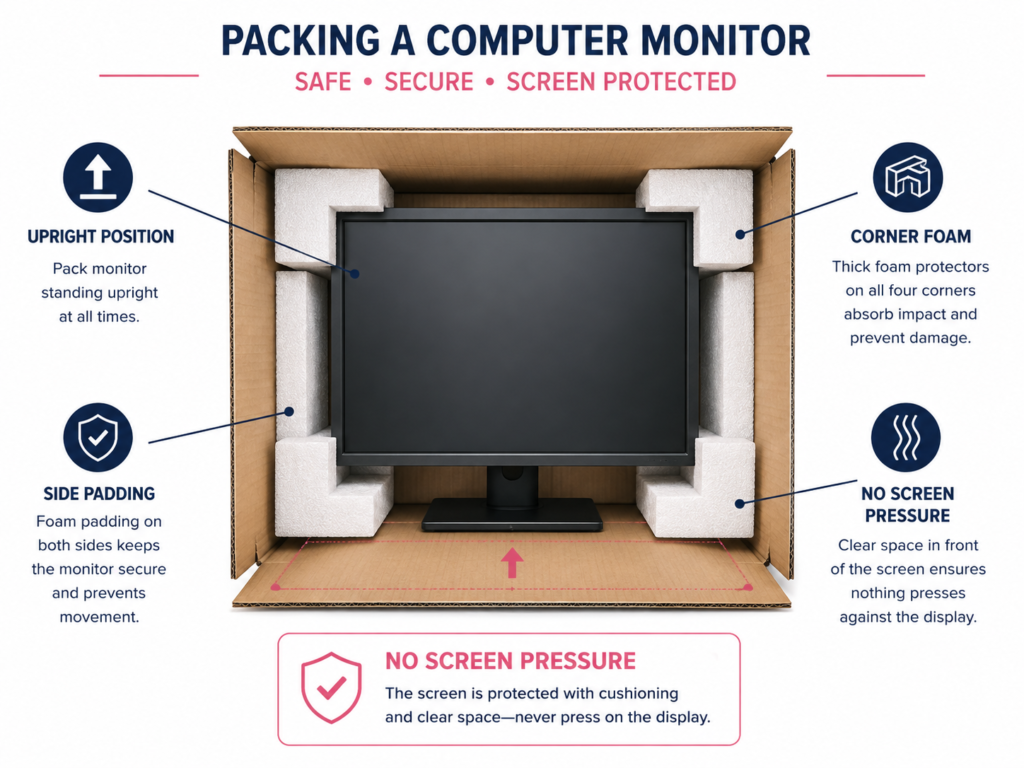
Move monitors upright inside fitted boxes with rigid protection around the screen. How to pack a monitor for moving starts with protecting the panel. Remove the stand when the model allows safe removal. Cover the display first with a clean, soft, non-abrasive layer.
Add corner protectors and firm cushioning around the monitor body. Never press bubble texture or hard cardboard directly against a delicate panel. The screen is a window with electronics behind it.
Our guide on how to pack fragile items explains the same cushioning principles. Keep monitor boxes away from table legs and sharp furniture corners. Do not put the cart before the horse by rushing loading.
Pack power leads, DisplayPort cables, HDMI cables, and stands in labelled accessory cartons. Photograph the stand position before disassembly. Good labels make setup at the other end a piece of cake.
Special Considerations for Gaming PCs and Workstations
Gaming PCs and workstations need extra protection because their internal parts are heavier. Large graphics cards, coolers, glass panels, and custom loops add leverage. Would you trust a heavy GPU to bounce unsupported for 900 kilometres?
Think of the tower as a small city of components. One heavy part can pull on another during repeated road vibration. Keep your eyes peeled for anything tall, heavy, or loosely mounted.
Heavy Graphics Cards
Heavy graphics cards should be removed or firmly supported when transport risk is high. Long cards can place strong leverage on the PCIe slot. Manufacturer procedures vary, so check your exact computer model.
Dell service guidance shows powered graphics cards require careful cable and retention release. If you remove one, use an anti-static bag and fitted padding. Do not touch exposed contacts more than necessary.
If removal feels beyond your skill, ask a technician before moving day. Never force a retention clip or pull a card by its fans. When in doubt, do not have a crack blindly.
Large CPU Coolers
Large tower CPU coolers can stress the motherboard during rough transport. The risk grows with tall heatsinks and long driving distances. Check the cooler mount before closing the case.
Consider professional removal for unusually heavy air coolers. Reinstalling them may require fresh thermal compound and correct mounting pressure. That job can be fiddly, so do not wing it.
If the cooler stays fitted, keep the case orientation stable. Avoid impacts that push sideways against the heatsink. An ounce of prevention beats a motherboard repair.
Liquid-Cooled PCs
Liquid-cooled PCs need leak checks, stable orientation, and careful temperature control. Inspect fittings, reservoirs, radiators, tubing, and pump mounts before transport. Photograph the loop before any work begins.
Sealed all-in-one coolers usually stay installed unless manufacturer guidance says otherwise. Custom loops may need specialist preparation before a long move. Do not drain or dismantle unfamiliar systems yourself.
Keep liquid-cooled towers upright and away from extreme cabin heat. Recheck every visible fitting before first power-up. Better to be safe than spewin over damaged hardware.
Custom-Built Workstations
Custom workstations need an inventory for expensive components and specialist peripherals. Record GPUs, capture cards, storage drives, expansion cards, and external equipment. Photograph serial numbers when practical.
Use separate boxes for control surfaces, audio gear, tablets, and calibration devices. Keep recovery media and licence information with you. Many hands make light work when every box has a clear label.
For office moves, assign one person to verify each workstation after delivery. That avoids mixed cables and missing accessories. A simple checklist keeps the whole show on the road.
Why Computers Are Vulnerable During Interstate Moves ?
Computers are vulnerable because long-distance movement combines shock, vibration, pressure, and handling. A tower may experience thousands of small road movements before delivery. Heavy internal parts amplify those forces through their mounts.
Monitors face pressure damage, scratched coatings, and cracked panels. Storage devices, fans, connectors, and glass also dislike rough impacts. It only takes one bad knock to throw a spanner in the works.
Good packing reduces movement before movement becomes damage. Rigid boxes control external pressure while cushioning manages shock. Strong loading control then stops the box travelling inside the truck.
Did you know?
A desktop tower can look secure while heavy internal parts still move. Long road vibration can stress graphics cards, coolers, connectors, and drive mounts.
How Australian Conditions Can Affect Computers in Transit ?
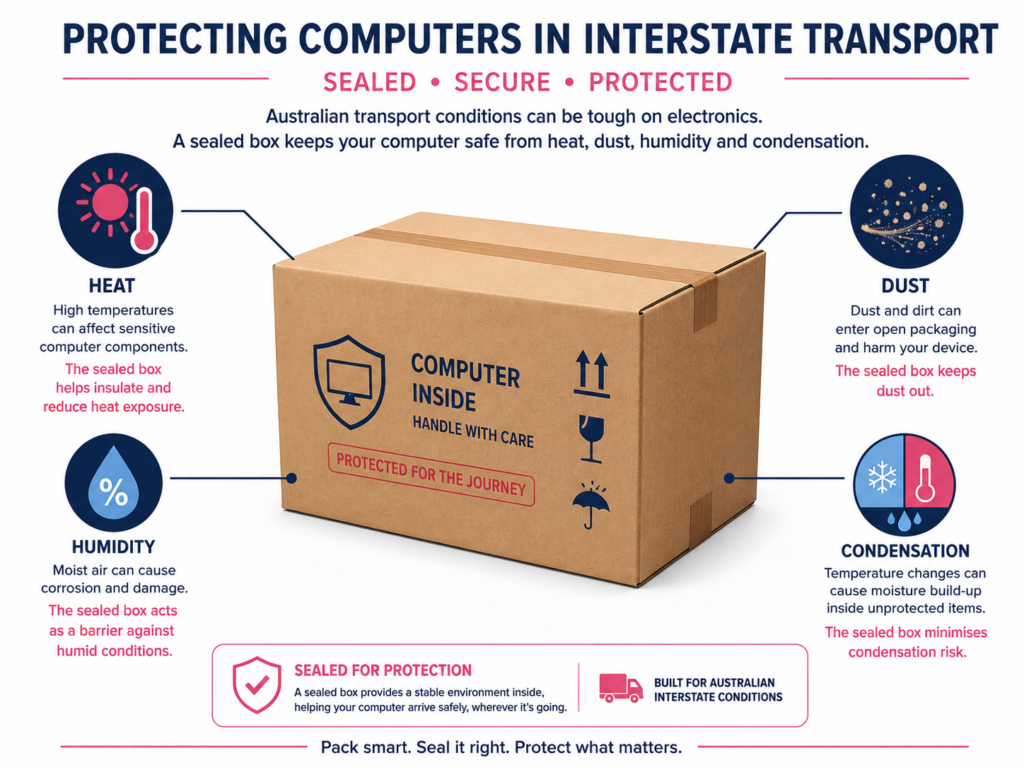
Australian heat, dust, humidity, and temperature swings can affect computers during transport. A parked vehicle can become much hotter than the surrounding air. Keep electronics away from prolonged direct sun and trapped heat.
Dust can enter open ports and vents when equipment sits uncovered. Humidity and sudden temperature changes can create condensation risk. Keep ports covered and boxes closed until the destination is ready.
After a cold or damp journey, let equipment reach room conditions before power. Do not energise a computer while visible moisture remains. Out bush or in the city, weather can turn on a dime.
Long routes also change exposure time. Regional roads can add more vibration than smooth urban travel. Pack for the whole journey, not just the first easy kilometre.
What to Do When Your Computer Arrives ?
Inspect the computer before connecting power or accessories. Check the carton, case, monitor, glass, ports, and visible internal supports. Photograph any crushed corners, punctures, dents, or wet areas immediately.
If you notice items damaged during an interstate move, document them before disposal. Keep packaging until any damage question is resolved. A picture is worth a thousand words during a claim discussion.
Let the computer acclimatise when temperature or humidity changed during transport. Then connect only essential power, display, keyboard, and mouse equipment. Start simple before rebuilding the full desk.
Listen during the first boot and watch for warning lights. Confirm storage, memory, network, and display devices appear normally. Touch wood, most correctly packed systems start without drama.
Common Computer Problems After an Interstate Move
Common post-move problems usually come from loose connections, power issues, or shifted components. Start with simple checks before opening the case. Record each change so troubleshooting does not become guesswork.
Do not open a power supply unit under any circumstances. Stop if you smell burning, see liquid, or hear severe grinding. If something looks dodgy, get a technician involved. Better safe than sorry applies here too.
Computer Won’t Start
A computer that will not start often has a simple power connection problem. Check the wall outlet, power board, cable, and rear PSU switch first. Confirm the monitor is not being mistaken for the computer.
If safe, inspect whether external plugs loosened during unpacking. A qualified person can check internal power connectors when needed. Start at square one before assuming expensive damage.
Do not repeatedly power-cycle a machine that smells hot or electrical. Disconnect power and seek professional help instead. You do not want to make a bad situation cactus.
No Display After Moving
No display usually comes from the wrong input, loose cable, or graphics connection. Confirm the monitor input matches HDMI or DisplayPort. Try a known-good cable before opening the tower.
For systems with a discrete GPU, connect the monitor to that graphics card. A shifted GPU can also cause no display. Do not jump the gun before checking the easy bits.
If reseating hardware is needed, follow the computer manufacturer procedure. Disconnect power first and use anti-static care. A technician is safer when the machine is expensive or unfamiliar.
Unusual Noise or Vibration
New rattling or grinding after moving deserves immediate attention. A cable may touch a fan, or a screw may have loosened. Mechanical drives and large coolers can also create unusual vibration.
Shut down if the sound is sharp, grinding, or suddenly worse. Inspect only what you can access safely. Nip it in the bud before a fan damages another part.
A gentle fan whoosh is normal after startup. Repeated clicking, scraping, or metal contact is not. Record a short video for a technician if the noise returns.
Loose Component Symptoms
Loose components can cause crashes, missing drives, artefacts, or intermittent startup problems. Memory or expansion cards may shift slightly after long vibration. Heavy GPUs deserve special attention after rough transport.
Check software symptoms against physical clues before changing settings. Reseating parts can help, but only when you know the correct procedure. Do not go off half-cocked with expensive hardware.
If a workstation contains business-critical data, avoid unnecessary experiments. Restore from backups only after hardware checks are complete. Protecting data matters more than winning a troubleshooting race.
How Much Does It Cost to Move a Computer Interstate?
Computer moving costs depend on route, box size, service type, and the wider load. A single computer may travel by courier or specialist freight. A household computer is often priced inside the total interstate move.
Six Brothers publishes broad interstate household pricing from about $1,000 to $5,000 or more. That figure covers whole moves, not one desktop computer. Your computer adds cost through packing, volume, insurance, and handling needs.
Backloading can reduce the transport share when your schedule stays flexible. Dedicated transport can cost more but offers tighter control over timing. You get what you pay for, but price still needs context.
Ask for a written quote covering packing materials, loading, delivery, and any cover. Declare gaming PCs, large monitors, and workstations before pricing. That stops nasty surprises on moving day.
When Should You Hire Removalists to Move Computers?
Hire removalists when computers form part of a larger interstate home or office move. Professional help also suits heavy gaming rigs, multiple monitors, and fragile workstations. The value rises when original packaging is unavailable.
Self-transport can suit one laptop, mini PC, or small desktop carried personally. Large towers and multi-screen setups need more restraint and planning. There is no point being penny wise and pound foolish.
Choose a removalist that explains packing, loading position, inventory control, and damage procedures. Ask how often the box changes hands during transit. Clear answers build trust before your equipment leaves home.
Our team can provide a free quote for Sydney interstate moves. Call 1300 764 372 or email info@sixbrothersremovalist.com.au. The goal is simple: careful handling with no last-minute guesswork.
FAQs
Do removalists pack for you?
Yes, many removalists offer packing services. Confirm whether computer boxes, monitor protection, and accessory labelling are included.
How much do interstate removalists cost?
Costs depend on distance, volume, service level, access, timing, and packing. Ask for a written quote based on your actual inventory.
Can I move a desktop PC interstate without removing the GPU?
Sometimes, but heavy GPUs need extra support. Removal is safer when the card is large and manufacturer guidance supports it.
Should I keep a computer with me or put it on the truck?
Carry irreplaceable backup drives and sensitive data separately. A well-packed desktop can travel safely in a secured removalist load.
How do I pack a monitor for an interstate move?
Use the original box when possible. Keep the monitor upright, cushioned, and protected from direct screen pressure.
How long should a computer sit before turning it on?
Wait until it reaches room conditions after major temperature changes. Never power it while visible condensation remains.
Can removalists move a liquid-cooled gaming PC?
Yes, with careful preparation. Custom loops may need specialist checks, while sealed coolers usually remain installed.
A careful interstate computer move is mostly preparation and restraint. Back up first, secure heavy parts, protect screens, and control movement. Do that, and the whole job becomes much less stressful.
Ready to plan the wider move? Get your free quote from Six Brothers today. We will help map the packing and transport around your actual setup. All good when the plan is sorted early.