


Table of Contents
Moving a television interstate needs more than a blanket and good luck. Flat screens are wide, thin, and easy to flex during loading. The safest method keeps the TV upright, boxed, padded, and firmly restrained. This guide shows how to move TVs interstate without turning moving day into damage day.
You will learn how to pack a TV for moving safely. You will also see when professional help makes sense. Can you transport a TV on its back and hope for the best? No worries, there is a safer way.

Step-by-Step Guide
The safest process is simple: prepare, protect, box, load upright, then unpack carefully. Each stage controls a different cause of screen damage. Think of the process like layers of armour around fragile glass. No worries, you do not need fancy tools for every step.
Start before removal day, especially for larger screens. Keep stands, screws, remotes, and cables together. Photograph the TV before packing and record its condition. A clear moving inventory list also helps if anything needs checking later.
After these five steps, your TV should be ready for long-distance transport. If you prefer help, request a free quote before moving day. That keeps packing choices and vehicle space clear from the start.
1. Prep and Clean
Prepare the TV by switching it off, unplugging every cable, and removing loose accessories. Let the set cool before wrapping it. Dust the frame with a dry microfibre cloth. Avoid spraying cleaner directly onto the screen.
Take photos of cable positions before disconnecting them. Place remotes, feet, screws, and brackets inside labelled bags. Attach each bag to the matching accessory box, not the television. A stitch in time saves nine when reassembly begins.
For wall-mounted sets, check the model manual before removing brackets. Have another adult support larger screens during removal. Never lift a large television by one corner. That can twist the frame and stress the panel.
2. Wrap and Shield
Wrap the television with a soft screen layer, corner protection, and padded outer coverage. Start with a clean foam sheet or soft moving blanket. Keep rough surfaces, tape, and bubble edges away from the display.
A TV screen protector for moving can add useful abrasion protection. It does not replace a rigid box or edge cushioning. Better safe than sorry applies here. The screen is a glass sail, so pressure spreads quickly across it.
When learning how to wrap a flat screen TV for moving, protect every corner first. Then secure the padding around the frame. Do not pull straps tightly across the centre. Good protecting belongings during a move starts by controlling pressure points.
3. Box It Up
Box the TV inside its original carton or a properly sized TV moving box. The box should hold the television upright without crushing the panel. Fill side gaps with foam, corner pieces, or clean padding.
A flat screen TV moving box should fit the screen closely. Too much free space lets the set gain momentum during braking. Too little space can squeeze the frame. Job’s right when the TV cannot shift inside the carton.
Label both sides with ‘TV’, ‘Fragile’, and ‘Keep Upright’. Mark the screen side if the box design allows it. Keep power cables and remotes in another small box. This prevents hard accessories from pressing against the panel.
4. Load and Secure in the Vehicle
Load the boxed TV upright and secure it against a broad, padded surface. Place it between stable items that cannot collapse. Use straps around the box, not directly across the television.
The box should not slide, tip, or carry heavy weight above it. Keep it away from loose tools, furniture legs, and metal frames. Steady as she goes is the right rule here. Good restraint matters more on long interstate roads.
For how to transport a TV in a car, check vertical clearance first. A tall SUV or van may work for smaller screens. For how to transport a TV in a ute, use a covered canopy. Secure the box upright against weather and movement.
5. Unpacking at Your New Home
Unpack the TV upright and use two people for larger screens. Move the carton inside before opening it. Keep the room clear of pets, children, boxes, and sharp tools.
Remove the top packing first, then lift the box away when possible. Avoid dragging cardboard across the screen. Easy does it, especially with ultra-thin panels. Check the frame, screen, ports, and stand parts before powering on.
Compare the television with your pre-move photos. If you see cracks or impact marks, stop there. Photograph the packaging and damage before discarding anything. Those records can help with a transport claim.
What You Need ?
You need soft padding, rigid edge protection, a suitable box, labels, and secure straps. A tape measure helps confirm doorway, vehicle, and carton clearance. Clean microfibre cloths keep grit away from the display.
Useful materials include foam corners, moving blankets, stretch wrap, and cardboard sheets. Use packing tape on the box only. Avoid direct tape on the screen or frame. Good as gold means every material has one clear job.
For bigger moves, add a simple interstate relocation checklist to your plan. It helps coordinate lift bookings, parking, access, packing, and delivery. Keep the TV supplies separate from general kitchen or bedroom packing.

Why screen damage occurs during long-distance transport ?
Screen damage usually comes from flexing, direct pressure, vibration, impact, or poor restraint. Modern panels spread force across a wide, thin surface. Even small frame movement can stress internal layers.
Long routes add thousands of small road vibrations. Sudden braking can also throw an unsecured box against nearby furniture. The danger is not only one big drop. She’ll be right is not a packing method for fragile electronics.
Heat, moisture, and dirty packing can create secondary problems. Grit may scratch coatings during vibration. Damp cartons can lose strength. A rigid box and stable upright position reduce several risks together.
Did you know?
Manufacturer guidance commonly recommends moving large TVs upright, using original-style packing, avoiding screen pressure, and reducing jolts or vibration.
Common transportation risks
The main risks are tipping, crushing, vibration, moisture, impact, and careless manual handling. Loose furniture can shift into the TV during braking. Stacked boxes can collapse onto the carton.
Rain creates another problem during driveway or ute loading. Open trays also expose televisions to dust and road debris. When it rains, it pours, so weather protection needs planning before loading starts.
Access risks also matter in Sydney units and narrow homes. Tight stair turns can twist a large screen. Lift doors may close quickly. Measure the route before carrying a 65-inch, 75-inch, or 85-inch television.
Which protection methods work best for interstate moves ?
The best protection combines a rigid box, soft screen layer, corner foam, and upright restraint. No single material solves every risk. The rigid carton manages impact while soft layers reduce rubbing.
Original moulded foam often provides the best fit for that exact model. A quality aftermarket TV box comes next. DIY cardboard can work when properly reinforced. Horses for courses, because screen size changes the best setup.
For premium or very thin TVs, consider custom crating or professional packing. That can reduce uncertainty around frame flex. The extra protection matters most on long routes, shared loads, and repeated handling.
Are purpose-built TV boxes worth the investment ?
Purpose-built TV boxes are usually worth it for valuable, large, or ultra-thin televisions. They provide stronger edges and more predictable internal clearance. Many include foam corners or adjustable sleeves.
A proper TV moving box also makes upright restraint easier. The broad carton spreads strap pressure around the set. You get what you pay for when the alternative is loose cardboard.
The original box remains an excellent option when it is dry and intact. Check that foam pieces still fit correctly. Replace damaged corner pieces instead of hoping crushed packaging will perform twice.
How effective are DIY protection methods ?
DIY protection can work well when the screen is smaller and the packing is disciplined. Use clean blankets, foam corners, rigid cardboard, and secure upright positioning. Avoid loose wrapping that leaves movement inside.
The biggest DIY weakness is often the box structure. Home-made sleeves may bend during stacking or braking. Make do can be fine, but only when the structure remains firm.
Removalist truck hire gives DIY movers control over loading time. It also makes you responsible for restraint and handling. If the TV is expensive, professional packing may be cheaper than replacement.
How should you position TVs during interstate transport ?
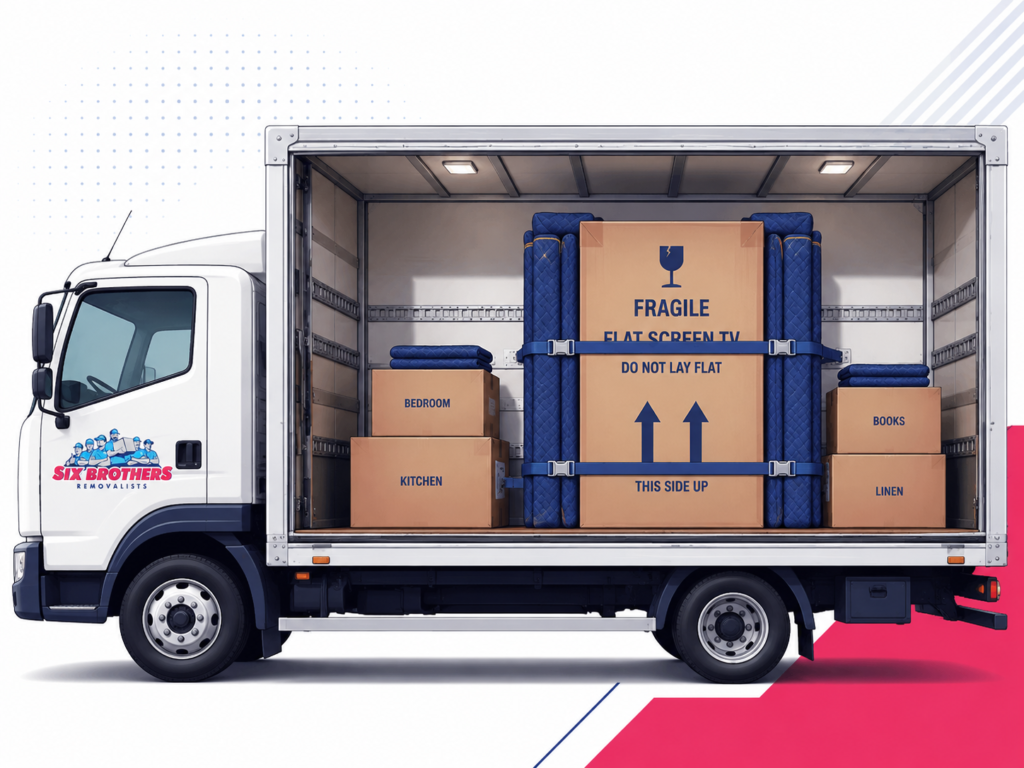
Keep TVs upright during interstate transport and secure them against a stable padded surface. Avoid laying the set flat for the road trip. Never stack furniture or boxes on top.
What happens if you lay a TV flat? Road vibration can flex the panel and frame. Weight can also transfer unevenly across the screen assembly. Straight as a die is the safer transport position.
The carton should face the direction recommended by its handling marks. Keep straps snug rather than crushing. Position the screen away from sharp furniture edges. Leave enough clearance for straps to stay stable.
What the research says about TV moving safety ?
Manufacturer guidance strongly favours careful handling, upright transport, and protection from vibration. LG’s TV handling guidance recommends original-style packing and upright carriage. It also warns against pressure on the screen.
Sony’s transport guidance also recommends moving a television upright. Sony notes that flat transport can expose the screen to damaging vibration. The proof is in the pudding when separate brands give similar advice.
This does not mean every brief tilt will destroy a TV. Stand assembly can require a padded face-down position. Long-distance vehicle transport creates different forces. Follow the manual for your exact model whenever available.
Does TV Type Change How You Should Move It Interstate?
Yes, TV type changes the handling risk, although upright transport remains the safest baseline. Panel thickness, weight, stand design, and frame stiffness all matter. Different strokes for different folks applies to screens too.
Check the model manual before packing. Some televisions have fragile decorative edges or unusual stand mounts. Others need specific lifting points. Treat size and construction as separate risk factors.
OLED TVs
OLED TVs need strong support because many models use very thin panels. Avoid pressure on the display and flexing through the frame. Two people should carry larger sets from supported frame areas.
Use close-fitting foam and a rigid TV moving box. Keep the panel upright in the vehicle. Handle with kid gloves is the right mindset here. Premium OLED replacement costs can make shortcuts painful.
LED and QLED TVs
LED and QLED TVs still need upright transport, edge protection, and firm restraint. Their panels can crack or develop pressure damage. Do not assume a thicker cabinet makes the screen tough.
Original packaging remains useful for these sets. Aftermarket cartons also work when sizing is correct. No dramas, just avoid direct screen pressure. Keep the carton dry and away from unstable furniture.
Plasma TVs
Plasma TVs are often heavier and should stay upright throughout transport. Older sets may also have substantial glass panels. Use two or more people for safe manual handling.
Do not lay a plasma television flat for a long road journey. Secure it firmly and reduce vibration where possible. An oldie but a goodie still deserves proper protection. Weight can make tipping more dangerous.
Ultra-Thin TVs
Ultra-thin TVs need extra protection against flexing and twisting. Support the frame evenly and avoid one-person lifting. Use rigid packaging that controls movement across the whole television.
A custom crate can make sense for very large premium screens. Keep the load upright and isolated from heavy furniture. Thin as a wafer means there is little margin for rough handling.
How to Move a Wall-Mounted TV Interstate ?
Move a wall-mounted TV by removing the screen first, then packing the bracket separately. Never transport the TV while attached to the wall mount. The bracket can act like a lever during impact.
For how to move a wall mounted TV, photograph every cable and mounting point. Support the set before removing the final screws. Measure twice, cut once fits the job, even without cutting anything.
Bag and label the bracket bolts, spacers, and wall-plate hardware. Do not tape metal parts to the screen carton. At the new home, confirm wall structure before reinstalling the mount.
How to Move a Large TV Interstate ?
Move a large TV with at least two capable adults and a rigid upright packing system. Screen size changes doorway clearance, vehicle height, and turning space. Bigger panels also flex more easily.
For how to move a 65 inch TV, use a fitted box and two-person carry. For how to move a 75 inch TV, measure lifts and stair turns first. For how to transport an 85 inch TV, consider professional packing.
How to move a large flat screen TV safely comes down to support. Carry from strong frame areas and avoid gripping the display. Many hands make light work, but only when everyone knows the route.
Backloading vs Dedicated Transport for TVs
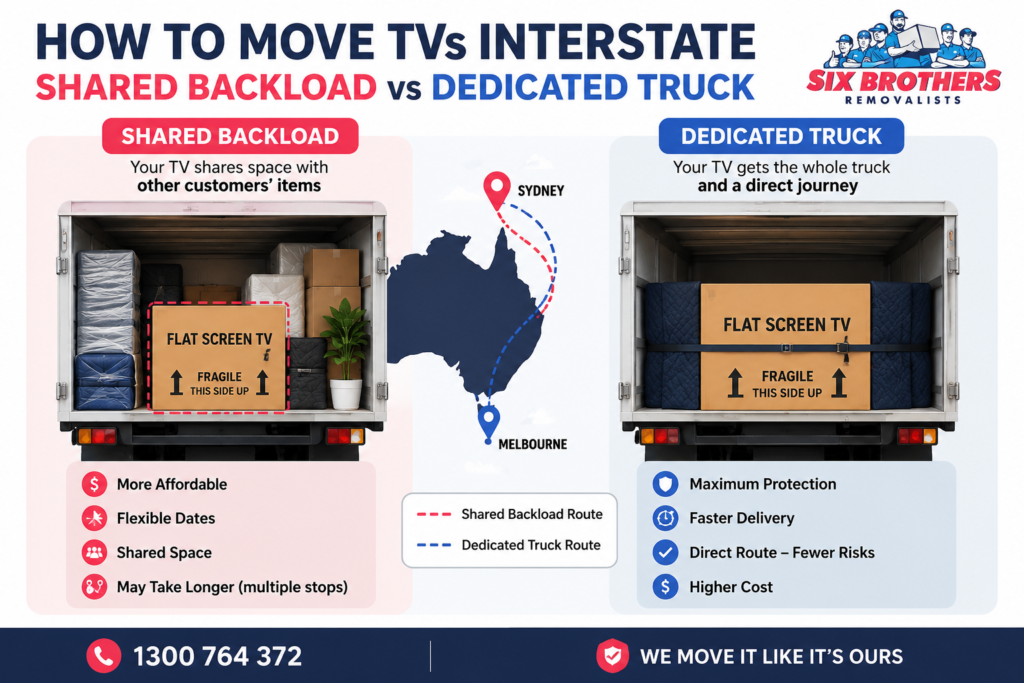
Backloading can save money, while dedicated transport gives more control over timing and handling. Both methods can move a TV safely when packing and restraint are correct. The real difference is logistics.
Interstate backloading uses available truck space on an existing route. It suits flexible delivery dates and well-packed televisions. Dedicated transport suits tight deadlines, very valuable screens, or complex access.
There is no one-size-fits-all answer. Horses for courses is the useful rule here. Ask how many times the television may be handled before choosing the service.
| Factor | Backloading | Dedicated transport |
| Timing | Flexible delivery windows | More direct scheduling |
| Cost approach | Uses spare truck capacity | Pays for dedicated capacity |
| Best fit | Flexible moves with strong packing | High-value or time-sensitive TVs |
| Key question | Ask about handling and transfers | Ask about route and restraint plan |
When does professional TV moving make sense ?
Professional TV moving makes sense when the screen is large, valuable, awkward, or difficult to access. It also helps when you lack a suitable vehicle. Stairs, lifts, narrow entries, and long carries increase risk.
A furniture removalist can plan padding, lifting, loading, and restraint as one process. Interstate removalists should also explain handling during depot transfers. Leave it to the experts when replacement risk feels too high.
House removalists, office removalists, furniture removalists, and piano removalists handle different load profiles. Interstate furniture removalists should understand fragile electronics inside mixed furniture loads. International removalists use similar protective principles for longer freight journeys.
Searches for removalists near me or removalist near me can return very different operators. Compare removalist companies by process, insurance, reviews, and written pricing. Cheap removalists can be suitable, but packing standards still matter.
What should you expect during professional interstate TV moving ?
Expect a professional team to assess size, access, packing, loading position, and delivery conditions. Good operators ask about screen size before moving day. They may recommend a fitted carton or custom protection.
On loading day, the team should carry the TV upright and control each turn. The television should be secured inside the vehicle. That is the good oil, because restraint quality matters after loading.
For Sydney routes, terms like removalist from Sydney and interstate removalists Sydney cover many services. Sydney removalists may offer backload or dedicated options. Removalists Parramatta and removalists western Sydney may also service interstate routes.
Common routes include removalists Sydney to Melbourne and Sydney to Melbourne removalists. Others include removalists Sydney to Brisbane and Sydney to Brisbane removalists. Furniture removalists Sydney teams often carry televisions beside household furniture. An interstate removalist Sydney service may offer backloading. Sydney interstate removalists also run dedicated routes. Other common searches include removalists Sydney to Adelaide and interstate removalists Sydney to Adelaide. For shorter routes, removalists Sydney to Canberra and Sydney to Canberra removalists are common terms. For coastal NSW, removalist Sydney to Newcastle NSW is another common search. Removalists Sydney to Newcastle should still use the same upright TV controls.
What to Ask a Removalist Before Moving Your TV ?
Ask how the team packs, carries, restrains, transfers, and covers televisions during interstate transport. Request clear answers before accepting the quote. Fair dinkum operators should explain the process without vague promises.
Ask whether the quote includes a TV box, packing labour, stairs, and extra handling. Check whether depot transfers are involved. Ask what happens if delivery timing changes. Confirm how damage reporting works.
If comparing removalists Sydney options, look beyond the cheapest headline price. The same applies to removalists Melbourne and removalists Brisbane. Is a cheaper quote still cheaper after a cracked screen? Written inclusions make comparisons much easier.
Useful searches include best removalists Sydney, recommended removalists Sydney, and affordable removalists Sydney. Also compare cheap removalist Sydney offers carefully. Removalist Sydney reviews can reveal how teams handle fragile items.
You may also see furniture removalist Sydney, office removalists Sydney, and house removalists Sydney. Some quote forms call this removalist furniture handling. These phrases describe service types, not identical expertise. Ask specifically about televisions before booking.
How Much Does It Cost to Move a TV Interstate?
There is no universal fixed price for moving one TV interstate. Cost depends on route, screen size, packing, access, service type, and handling. Backloading can reduce transport cost when dates are flexible.
Six Brothers’ current Sydney removalist rates guide lists local crews around $120 to $200 hourly. Interstate pricing works differently and usually reflects distance and load volume. Without route and access details, the price is still a piece of string.
A 65-inch screen with original packaging may need less preparation than an 85-inch OLED. Stairs or difficult parking can also add labour. Cheap removalists Sydney quotes should still show all inclusions clearly.
Route terms often include removalist Sydney to Melbourne or interstate removalists Sydney to Melbourne. You may also compare removalist Sydney to Brisbane and interstate removalists Sydney to Brisbane. Adelaide and Canberra routes follow the same pricing logic.
Use published removalist rates as a starting point, then request a written interstate quote. Share the television size and packing needs. That gives the estimator enough detail for a realistic figure.
What to Do If Your TV Arrives Damaged ?
If your TV arrives damaged, stop unpacking and document the condition immediately. Photograph the screen, carton, foam, impact marks, and labels. Keep all packaging until the claim process is clear.
Contact the removalist quickly and follow their damage reporting process. Do not discard broken packaging or attempt repairs first. Keep your cool, because clear records help everyone assess what happened.
If you used Six Brothers Removalists, contact the team on 1300 764 372. You can also email info@sixbrothersremovalist.com.au. Provide your booking details, photos, and a short damage description.
Before your next move, keep original packaging where practical. Photograph valuable electronics before loading. A careful plan is easier than a damage claim after delivery.
FAQs
How much do interstate removalists cost?
Interstate removalist costs depend on distance, volume, access, timing, packing, and service type. Ask for a written quote based on your exact route and television size.
Do removalists have insurance?
Cover varies by operator, policy, and move type. Ask what cover applies to televisions and what exclusions exist before booking.
Can you transport a TV on its back?
Avoid flat transport for long road journeys. Manufacturer guidance commonly recommends keeping TVs upright and protected from vibration.
How do you pack a flat screen TV without the original box?
Use a fitted TV box, foam corners, a soft screen layer, and rigid side protection. Keep the packed television upright.
Can a 65-inch TV fit in a car?
It depends on the vehicle’s vertical clearance and safe restraint points. Do not force the screen flat to make it fit.
How should you transport a 75-inch TV interstate?
Use two-person handling, a rigid fitted box, upright loading, and strong restraint. Measure every doorway and lift before moving day.
Is backloading safe for a television?
Yes, when the TV is properly packed and restrained. Ask about transfers, handling points, and delivery timing before booking.
Should you remove a TV wall mount before moving?
Yes. Remove the television from the wall mount, then pack the bracket and hardware separately.
For a safer interstate move, share your TV size before booking. The team can plan packing and vehicle space. Call 1300 764 372 or email info@sixbrothersremovalist.com.au for a free quote.